
Hot reload of normal class files
Property changes
public class User {

    private String userId;

    private String name;
    private String userName;

    private Integer userAge;
}- You can use the new
userIdattribute. - Remove the
nameattribute, and use the newuserNameattribute. - You can use the new
userAgeattribute.
Method changes
public class UserUtils {

    public static String getUserName(UserVO userVO) {
        return userVO.getName();
    }

    public static User getDefaultUser() {
    public static User genDefaultUser () {
        User user = new User();
        user.setUserId(0);
        user.setUserId(Id.next());
        user.setName("default");
        user.setUserName("default");
        user.setUserAge(0);
        return user;
    }
}- You can use the new
getUserNamemethod. - Remove the
getUserDefaultUsermethod, and use the newgenDefaultUsermethod.
Static information changes
Support static variables, static final variables, and static code blocks.
public class StaticClass {

    private static String var1 = "debug";
    private static String var1 = "tools";

    private static final String var2 = "debug";
    private static final String var2 = "tools";

    private static String var3;

    static {
        var3 = "debug";
        var3 = "tools";
    }

}
After being overloaded, the values of variables var1, var2, and var3 are changed.
WARNING
Hot reloading of static variables will re-execute the class's clinit method, so hot reloading will overwrite the runtime value with the value initialized at compile time.
Cause
If the following changes are not overridden, var1 will not change from String to Integer.
private static String var1 = "debug";
private static Integer var1 = 666;
However, in the following scenario, var1 will add data at runtime. If you overwrite it, you will lose the runtime data.
private static Map<String, Long> var1 = new HashMap<>();Therefore, DebugTools will overwrite runtime data by default, but you can prevent overwriting of field runtime data using the following method.
Solution 1: assign the variable only when it is empty in the static code block
private static Map<String, Long> var1;

static {
    // This way, executing this code block when calling the clinit method will not overwrite runtime data.
    if (var1 == null) {
        var1 = new HashMap<>();
    }
}
Solution 2: configure it in the plugin
When the mouse is on a static field, open the context menu and click Ignore this static field during hot reload.
After adding it, a hint icon appears in the gutter. Click the icon to remove the ignore rule from the current configuration.

You can also maintain ignored static field configuration in Settings | DebugTools | Hot Reload. This page can switch the active configuration file, reload the list, view details, or add a new configuration.
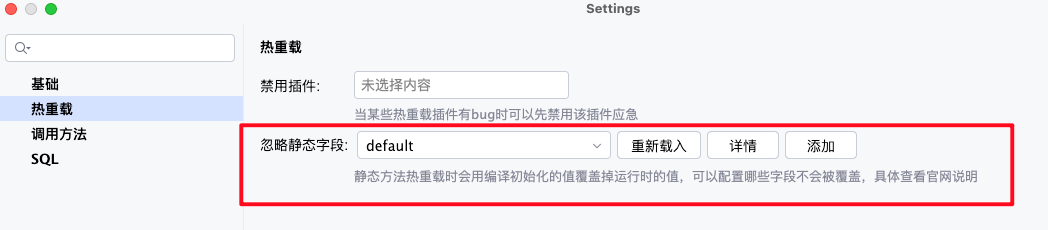
- Dropdown: select the ignored static field configuration used when hot reload starts. The default configuration name is
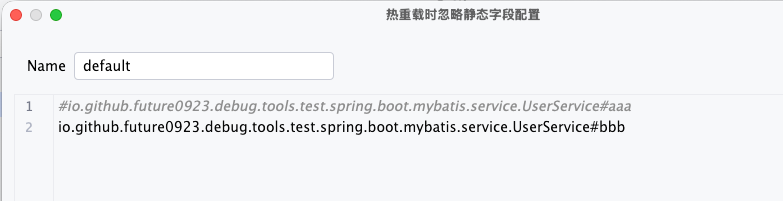
default. Reload: reread the configuration file list from the local configuration directory.Detail: open the selected configuration file so you can edit the rules directly.Add: create a new ignored static field configuration file, useful for saving different rule sets for different projects or scenarios.
Configuration files are stored under .debugTools/IgnoreStaticField/ in the local user directory. The file content is regular .conf text. Rules support both class#fieldName and class.fieldName, and comments starting with # or ;.
Enumeration class information changes.
public enum StatusEnum {

    A1,
    A22,
    A2,
    A3,
}
After the change, there are only two enumeration values, A2 and A3.
public enum StatusEnum {

    A1(1, "a"),
    A1(1, "A"),
    A22(22, "BB"),
    A2(2, "B"),
    A3(3, "C"),
    ;
    private final Integer code;

    private final String name;

    public StatusEnum(Integer code, String name) {
        this.code = code;
        this.name = name;
    }

    public Integer getCode() {
        return code;
    }

    public String getName() {
        return name;
    }

    public StatusEnum of(Integer code) {
        for (StatusEnum statusEnum : StatusEnum.values()) {
            if (statusEnum.getCode().equals(code)) {
                return statusEnum;
            }
        }
        return code;
    }
}
The content will take effect after being changed.
Internal class changes
public class UserVO {

    private String userName;

    private List<RoleVO> userRoles;

    public static class RoleVO {

        private Long roleId;

        private String name;
        private String roleName;

        private Integer status;

        public String getName() {
            return name;
        public String getRoleName() {
            return roleName;
        }

        public String getStatusName() {
            return status == 1 ? "正常" : "禁用";
        }

    }

    private List<AuthVO> userAuths;

    public class AuthVO {

        private String authName;

    }
}- Added
userAuthsattribute. - Modified
RoleVOinternal class information for normal use. - Added
AuthVOinternal class information for normal use.
Abstract class
Turn on hot reload, and when the abstract class is modified, all subclasses will take effect.
public abstract class User {

    public String getUserName() {
        return "default";
    }
}

public class Debug extends User {

}

public class Tools extends User {

}
After hot reloading User, both Debug and Tools can use the getUserName() method.
Interface
When the default method of an interface is modified, all implementation classes will take effect.
public interface User {

    default String getUserName() {
        return "default";
    }
}

public class Debug implements User {

}

public class Tools implements User {

}
After hot reloading User, both Debug and Tools can use the getUserName() method.