
Method Pre/Post Scripts
Method pre/post scripts let you insert Java logic before and after the target method invocation.
They are useful for temporarily preparing debug context, such as writing ThreadLocal values, adjusting arguments, preparing login state, recording invocation context, or observing return values and exceptions.
DebugTools sends the selected Java script together with the current method invocation request to the target JVM, then dynamically compiles and executes it under the target ClassLoader.
Entry Points
Method Invocation Page
Open the Method Script tab on the method invocation page, then select the script to execute with the current request. Select the empty item to run the method without a script.
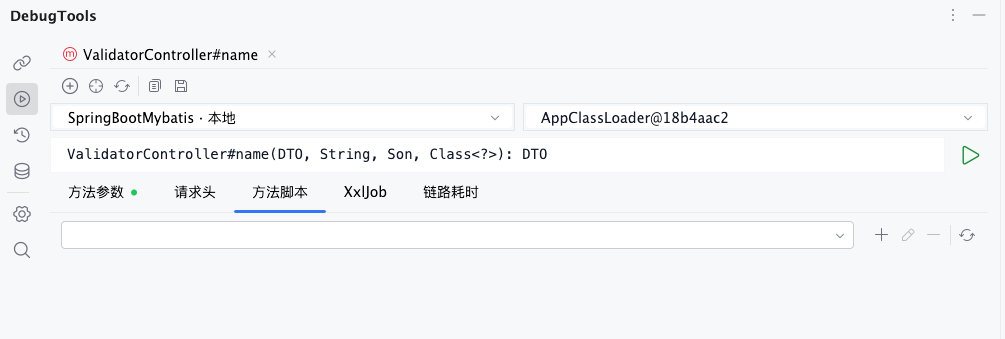
After a script is selected, the current connection records the default script name. When opening other method invocation pages under the same connection, this default script is filled in first. If a single method has saved request parameters before, the script selection in the method cache takes precedence.
Connection Management Page
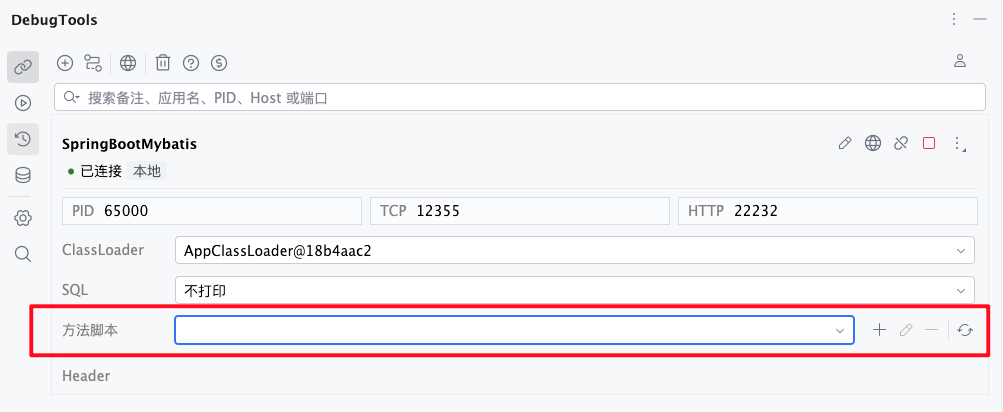
After expanding a connection card, you can also maintain the default Method script for the current connection. The selected script becomes the default value for newly opened method invocation pages under that connection.
Script Toolbar
The toolbar next to the method script dropdown is used to maintain script files:
| Button | Description |
|---|---|
 | Create a Method Around script and open the Java editor dialog. |
 | View or edit the selected script. Disabled when no script is selected. |
 | Delete the selected script file and remove it from the dropdown. Disabled when no script is selected. |
 | Rescan the current project's script directory and refresh the dropdown. |
When adding or editing a script, the dialog lets you fill in the script name and use Optimize imports, Reformat code, and Shorten class reference. Click Save to save the script as a Java file under the current project.
Storage Location
Scripts are saved under the current IDEA project:
.idea/DebugTools/MethodAround/[script-name].javaFor example, if the script name is LoginContext, the file is:
.idea/DebugTools/MethodAround/LoginContext.javaTIP
- Script files are stored with the current project directory.
- The dropdown reads file names in this directory as script names.
- Deleting a script also deletes the corresponding
.javafile. - If you manually add, copy, or modify files in this directory, click to reload them.
Script Template
Creating a new script generates a fixed Java template. Keep the class name, package name, and method signatures unchanged, and only add your own logic inside method bodies.
package io.github.future0923.debug.tools.base.around;

import java.util.List;
import java.util.Map;

public class RunMethodAround {

    public void onBefore(Map<String, String> headers, String xxlJobParam, String className, String methodName, List<String> methodParameterTypes, Object[] methodParameters) {

    }

    public void onAfter(Map<String, String> headers, String xxlJobParam, String className, String methodName, List<String> methodParameterTypes, Object[] methodParameters, Object result) {

    }

    public void onException(Map<String, String> headers, String xxlJobParam, String className, String methodName, List<String> methodParameterTypes, Object[] methodParameters, Throwable throwable) {

    }

    public void onFinally(Map<String, String> headers, String xxlJobParam, String className, String methodName, List<String> methodParameterTypes, Object[] methodParameters, Object result, Throwable throwable) {

    }
}
Execution Order
During one method invocation, the script runs in this order:
onBefore: called before the target method executes.- The target method executes.
onAfter: called after the target method returns normally. You can read the return value fromresult.onException: called when the target method throws an exception. You can read the exception fromthrowable.onFinally: always called at the end, whether the target method returns normally or throws an exception.
If no script is selected, DebugTools does not execute any Method Around logic.
Method Parameters
| Parameter | Type | Description |
|---|---|---|
headers | Map<String, String> | The final merged headers for this invocation. |
xxlJobParam | String | The parameter filled in the XxlJob tab. Usually an empty string when not filled. |
className | String | Target class name. |
methodName | String | Target method name. |
methodParameterTypes | List<String> | Target method parameter type list, in method signature order. |
methodParameters | Object[] | Real target method argument array. You can modify array elements in onBefore. |
result | Object | Target method return value, available in onAfter and onFinally. |
throwable | Throwable | Target method exception, available in onException and onFinally. |
WARNING
- Do not change the package name, class name, or method signatures in the template. The target JVM invokes the fixed
RunMethodAroundclass and fixed method signatures by reflection. If the signatures do not match, the script cannot run. - If the application is started with Hot Reload, you can dynamically change class signatures such as adding, deleting, or changing fields and methods, but the parameters and return values of the
onXXXmethods must remain unchanged.
Example
The following example shows several common usages: add a header and adjust an argument before invocation, print the result after return, and print exception information when an exception occurs.
package io.github.future0923.debug.tools.base.around;

import java.util.List;
import java.util.Map;

public class RunMethodAround {

    public void onBefore(Map<String, String> headers, String xxlJobParam, String className, String methodName, List<String> methodParameterTypes, Object[] methodParameters) {
        headers.put("X-Debug-Source", "DebugTools");

        if (methodParameters.length > 0 && methodParameters[0] instanceof String) {
            methodParameters[0] = ((String) methodParameters[0]).trim();
        }

        System.out.println("before invoke: " + className + "#" + methodName);
    }

    public void onAfter(Map<String, String> headers, String xxlJobParam, String className, String methodName, List<String> methodParameterTypes, Object[] methodParameters, Object result) {
        System.out.println("invoke result: " + result);
    }

    public void onException(Map<String, String> headers, String xxlJobParam, String className, String methodName, List<String> methodParameterTypes, Object[] methodParameters, Throwable throwable) {
        System.out.println("invoke exception: " + throwable.getMessage());
    }

    public void onFinally(Map<String, String> headers, String xxlJobParam, String className, String methodName, List<String> methodParameterTypes, Object[] methodParameters, Object result, Throwable throwable) {
        System.out.println("invoke finished");
    }
}
TIP
The script runs in the target JVM, so System.out.println outputs to the target application console. Classes accessed by the script must also be loadable by the ClassLoader used for the current invocation.
Save and Restore
- Click
 in the method invocation toolbar to save the script selected for the current method. When the same method is opened again, it is restored together with the parameter JSON, headers, XXL-JOB parameter, and trace configuration.
 - When restoring a request from invocation history, DebugTools also fills in the script name selected at that time, making previous invocations easier to reproduce.
- After manually selecting a script on the method invocation page or connection management page, the current connection records this default script. Later, when opening a method page under the same connection that has no saved script selection, this default value is filled in automatically.
- Clearing
Method param cacheclears method-level script selections. It does not delete script files under.idea/DebugTools/MethodAround/, and it does not delete connection default script settings.
WARNING
Method scripts execute in the target JVM and in the same invocation flow as the target method. Avoid uncontrolled database updates, external requests, or long blocking logic in scripts. After debugging, clear the script selection or delete temporary scripts.