
Reactive
When debugging LLM, Agent, SSE, and other AI streaming APIs, Reactive can extract fragmented events and join them into a continuous result. It is especially useful for diagnosing AI streaming output.
When the target method returns one of the following types, the method invocation page shows the Reactive tab.
| Return Type | Description |
|---|---|
reactor.core.publisher.Flux | A multi-element reactive stream. Each onNext becomes one event in the result panel. |
reactor.core.publisher.Mono | A single-element or empty reactive result. It usually produces at most one NEXT event, then COMPLETE. |
org.reactivestreams.Publisher | The standard Reactive Streams Publisher type. |
java.util.concurrent.Flow.Publisher | JDK Flow Publisher. The IDEA side shows the Reactive tab, but the target JVM still subscribes using org.reactivestreams.Publisher, so the returned object must also be compatible with Reactive Streams Publisher to be pushed as a streaming result. |
Entry Point
Open a method invocation page for a method whose return type is Reactive. The page shows the Reactive tab.
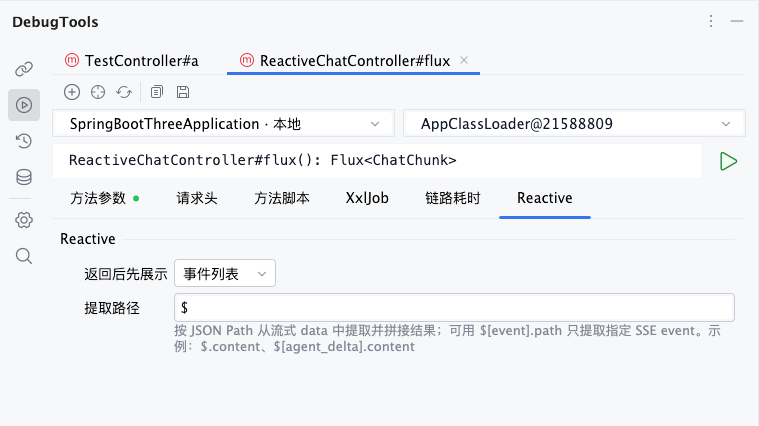
The Reactive tab contains two settings:
| Setting | Description |
|---|---|
Display after return | Controls which view the streaming result panel opens first. Available values are Event list and Extracted result. |
Extract path | Uses JSON Path to extract fields from each streaming data item and joins extracted values in event order. The default value is $. |
Response Display
Event List
Event list is the default display mode. After the streaming response starts, the result area switches to the streaming result panel and appends events in receive order.
After the request starts, the panel appends events in real time as callbacks such as onNext and onComplete arrive. Use this view first when you need to inspect the order, structure, and terminal state of a stream.
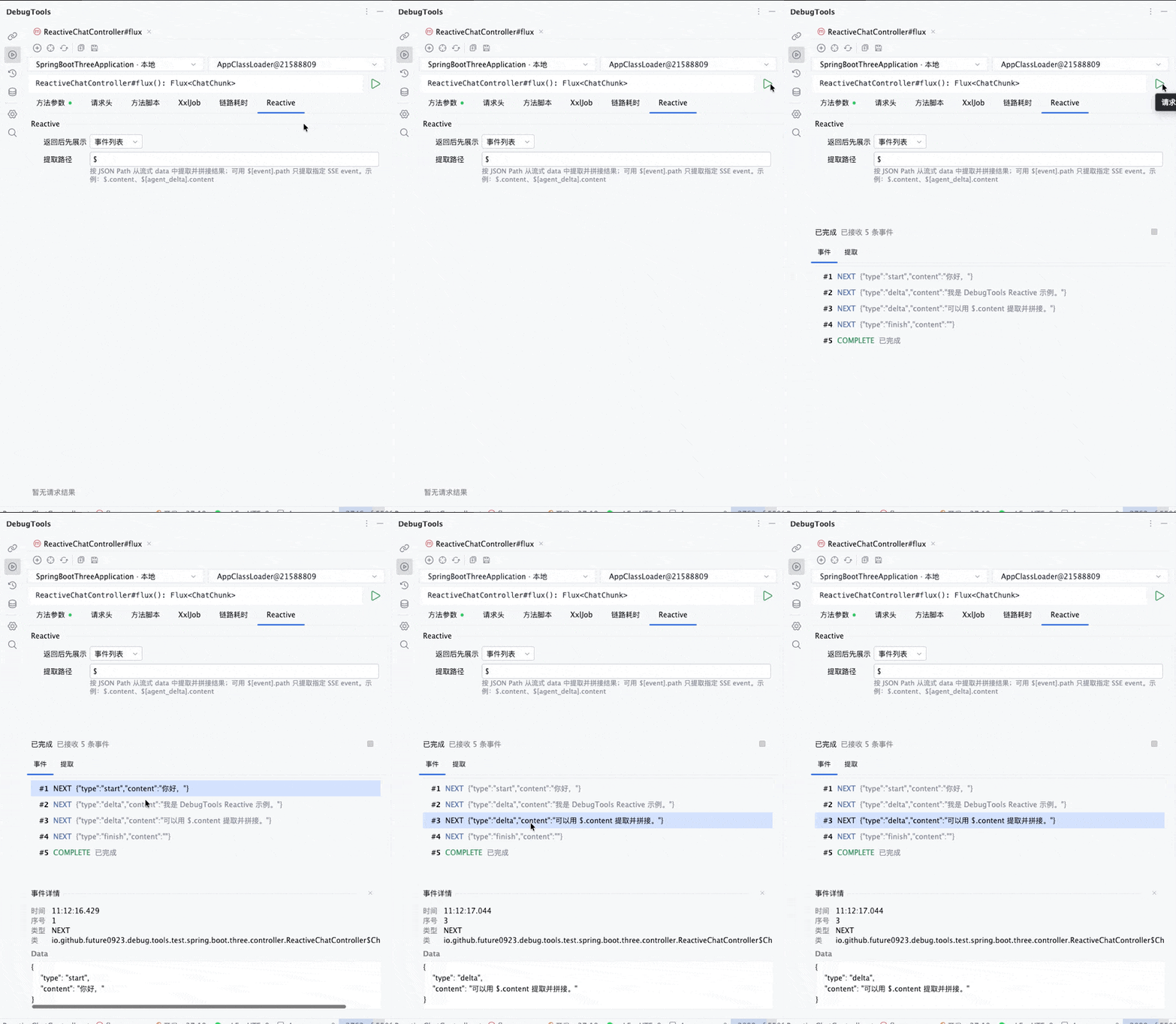
Each event shows:
- Sequence number, such as
#1or#2 - Event type, such as
NEXT,COMPLETE,ERROR, orCANCELLED SSEwhen the value is a SpringServerSentEvent- SSE
eventname - Data preview
Click an event to expand its details. The detail area shows receive time, sequence number, type, data type, SSE metadata, and formatted data.
Extracted Result
Extracted result joins values extracted from multiple streaming data items into one continuous result. It is suitable for debugging LLM streaming output, segmented text, incremental JSON, and similar responses.
When Display after return is set to Extracted result, the streaming result panel opens with the extracted result view first. You can also switch to the extracted result view manually in the result panel.
After switching to the extracted view, DebugTools reprocesses received NEXT events using the current Extract path, then continues appending extracted content as later events arrive.
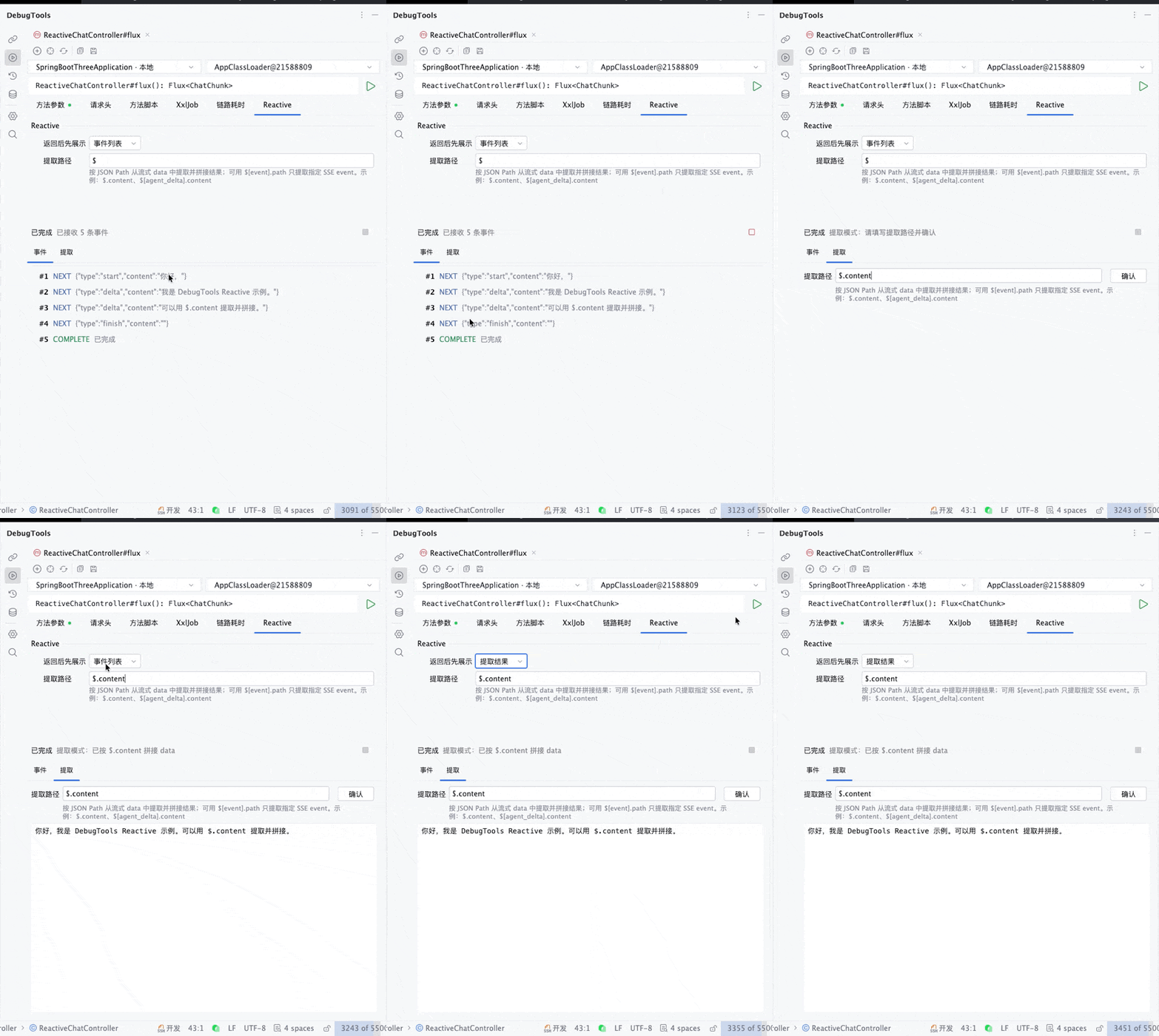
Extract path uses JSON Path to read values from each NEXT event's data:
| Example | Meaning |
|---|---|
$ | Extracts the whole data value. |
$.content | Extracts and joins data.content. |
$.choices[0].delta.content | Extracts a nested field from an object inside an array. |
$[agent_delta].content | Processes only SSE events whose event is agent_delta, then extracts data.content. |
The extracted result only processes NEXT events. COMPLETE, ERROR, and CANCELLED are not joined.
TIP
When entering an extract path, DebugTools dynamically generates path suggestions from received streaming data. For SSE, it also generates $[event] candidates so you can extract only a specific event type.
Extract Path Rules
Normal paths start from each event's data. For example:
$.contentThis reads the content field from each data item.
SSE event filter paths use:
$[event].pathHere, event is the SSE event name, and path is the JSON Path resolved inside that event's data. For example:
$[message].contentThis processes only SSE events where event = message, then extracts data.content from those events.
If the extracted value is a string, DebugTools joins the string directly. If the extracted value is an object or array, it is converted to a JSON string before joining.
SSE Display
If onNext returns a Spring org.springframework.http.codec.ServerSentEvent, DebugTools reads its SSE metadata through reflection.
In SSE scenarios, the event list shows the SSE event name, and the extracted result can use $[event].path to join only data from a specific event type.

| Field | Description |
|---|---|
event | SSE event name. |
id | SSE event ID. |
retry | SSE retry interval. |
comment | SSE comment. |
data | The actual data used for display and extraction. |
The event list in the result panel prioritizes the SSE type and event name. Extract paths can also filter by SSE event.
Remote Execution
After you start an invocation, the target JVM first executes the target method. If the return value is a Reactive Streams Publisher, DebugTools does not display it as an ordinary object result. Instead, it creates a subscription:
| Remote Event | IDEA Display |
|---|---|
onNext(value) | Appends a NEXT event. |
onComplete() | Appends a COMPLETE event and ends the streaming display. |
onError(error) | Appends an ERROR event, displays the stack trace, and ends the streaming display. |
| User stops the subscription | Appends a CANCELLED event and cancels the target-side subscription. |
Every time DebugTools receives an onNext, it requests the next item from the subscription. This keeps receiving streaming responses while avoiding pulling an infinite stream all at once.
Stop Streaming Request
While a streaming response is still running, click Stop in the result panel.
After clicking it, IDEA sends a cancellation request to the target application. The target JVM calls cancel() on the subscription and returns a CANCELLED event. The page then exits the running state for the current request.
DebugTools also clears active streaming responses in these cases:
- Starting another method invocation
- Closing the current method invocation tab
- The IDEA connection to the target application disconnects
Recommendations
- For ordinary streaming APIs, start with
Event listto confirm each event's structure and order. - After the
datastructure is clear, switch toExtracted resultand enter a stableExtract path. - For SSE, prefer
$[event].pathto avoid joining data from different event types together. - For streams that may run indefinitely, click
Stopafter debugging to avoid keeping the target application subscribed.