
Method Parameter JSON
Method parameter JSON is the input protocol used by DebugTools when invoking Java methods. It describes the source type and content of each method parameter. The target JVM converts content into the real Java argument according to type.
Basic Format
The root node is a JSON object. Each field in the root object corresponds to one method parameter. The field name is usually the Java method parameter name, and the value contains fixed type and content fields:
{
  "[parameterName]": {
    "type": "[type]",
    "content": "[content]"
  }
}
type decides how the target JVM converts content into the real argument. When the invocation panel is opened, IDEA automatically detects and fills the initial parameter JSON.
WARNING
In non-Spring parameter conversion scenarios, the target JVM matches method parameters by the field order of the root object. Spring methods prefer matching by parameter name, but it is still recommended to keep the root object field order consistent with the method signature to avoid matching errors when compiled parameter names are unavailable.
Parameter Generation Mode
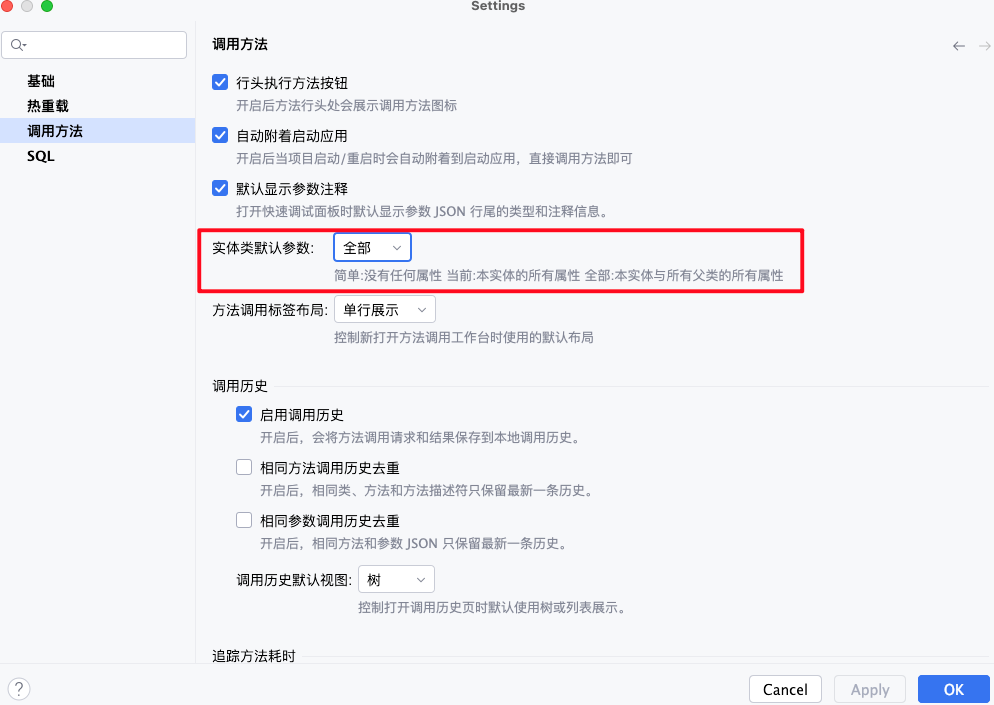
Simple: when a method invocation page is opened, entity parameters do not expand any properties by default.Current: when a method invocation page is opened, entity parameters expand all properties of the current entity by default.All: when a method invocation page is opened, entity parameters expand all properties of the current entity and all parent classes by default.
You can change the default generation format in Settings | Method Invocation. Default entity parameter controls the initial parameter JSON format when a method invocation page is opened.
TIP
- This setting only affects the initial JSON of method pages without parameter cache. If the same method has been saved with
 , the saved parameter content is restored first.
 - The generated template is only a starting point. You can delete unnecessary object fields or manually add nested fields as long as the final JSON matches the target Java type.
Supported Types
simple
simple is used for primitive types, wrapper types, strings, numbers, booleans, date/time values, URI, URL, Locale, and other simple values.
content can be a JSON string, number, boolean, or null:
{
  "id": {
    "type": "simple",
    "content": 10001
  },
  "enabled": {
    "type": "simple",
    "content": true
  },
  "name": {
    "type": "simple",
    "content": "Tom"
  }
}
TIP
- Write date/time values as strings.
LocalDateTimeandDatesupportyyyy-MM-dd HH:mm:ss,yyyy-MM-dd'T'HH:mm:ss,yyyy/MM/dd HH:mm:ss,yyyy.MM.dd HH:mm:ss,yyyy-MM-dd HH:mm,yyyyMMddHHmmss, andyyyyMMddHHmmssSSS.LocalDatesupportsyyyy-MM-dd,yyyy/MM/dd,yyyy.MM.dd, andyyyyMMdd.LocalTimesupportsHH:mm:ss,HH:mm,HHmmss,HH:mm:ss.SSS,HH:mm:ss.S, andHHmmssSSS.- Choose the concrete format according to the target parameter type.
Date/time example
{
  "startTime": {
    "type": "simple",
    "content": "2026-06-15 10:30:00"
  },
  "bizDate": {
    "type": "simple",
    "content": "2026-06-15"
  }
}
enum
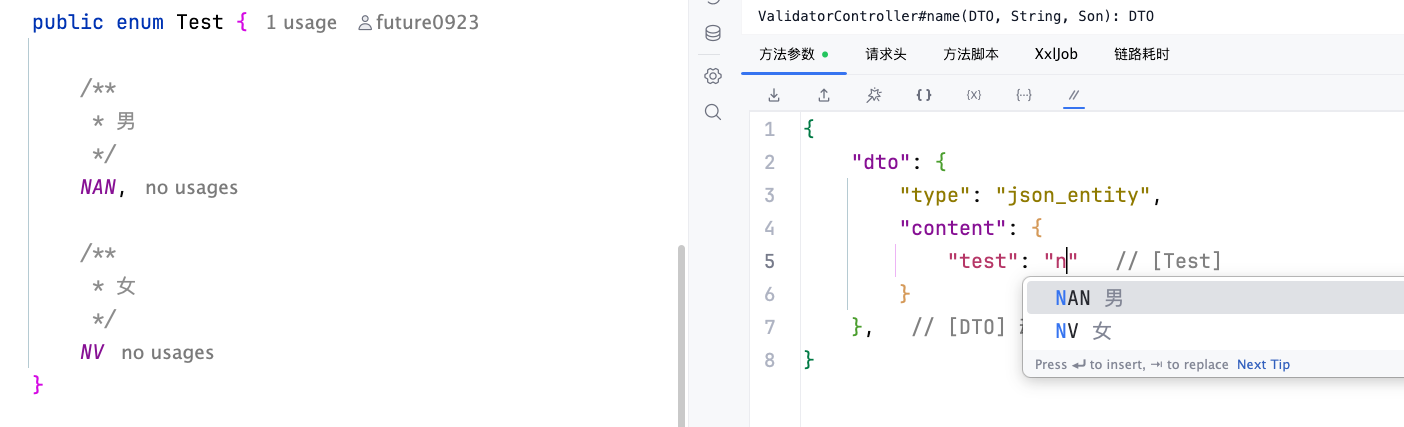
enum is used for enum parameters. It also supports enum arrays and collections such as List<Enum>.
For a single enum, write the enum constant name in content:
{
  "status": {
    "type": "enum",
    "content": "ENABLE"
  }
}
For enum arrays or enum collections, write a string array in content:
{
  "statuses": {
    "type": "enum",
    "content": ["ENABLE", "DISABLE"]
  }
}
When entering an enum name value, the editor suggests available enum constants and shows the enum comment summary after each candidate, which helps confirm the business meaning of each value.
file
file is used for java.io.File, MultipartFile, file arrays, or file collections.
For a single file, write the absolute path on the target application machine in content:
{
  "file": {
    "type": "file",
    "content": "/tmp/input.xlsx"
  }
}
For multiple files, write a path array in content:
{
  "files": {
    "type": "file",
    "content": [
      "/tmp/a.xlsx",
      "/tmp/b.xlsx"
    ]
  }
}
In Spring environments, MultipartFile and MultipartFile[] are converted to mock file objects after reading file content from the path. In normal non-Spring conversion, the result is java.io.File or a file array.
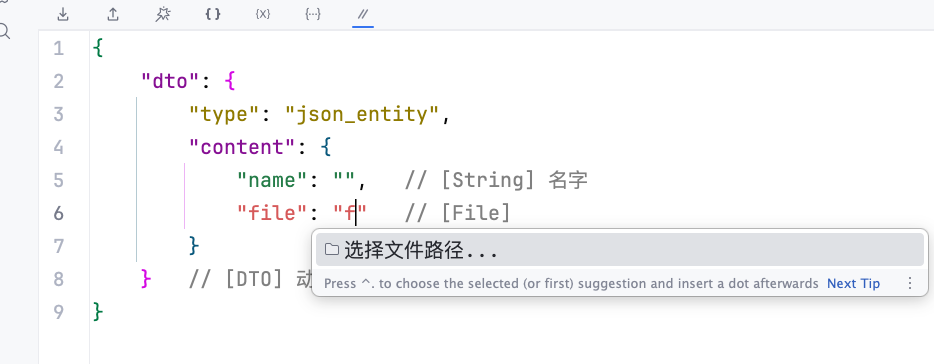
When filling File, MultipartFile, or similar file fields in content, enter file to trigger the file path completion item, then choose a file path to write it into the current JSON string.
class
class is used for Class<?> parameters. Write the fully qualified class name in content.
{
  "clazz": {
    "type": "class",
    "content": "com.example.demo.UserDTO"
  }
}
The target JVM loads the class through Class.forName. If the class name is wrong or not visible to the current ClassLoader, parameter conversion fails and null is passed in.
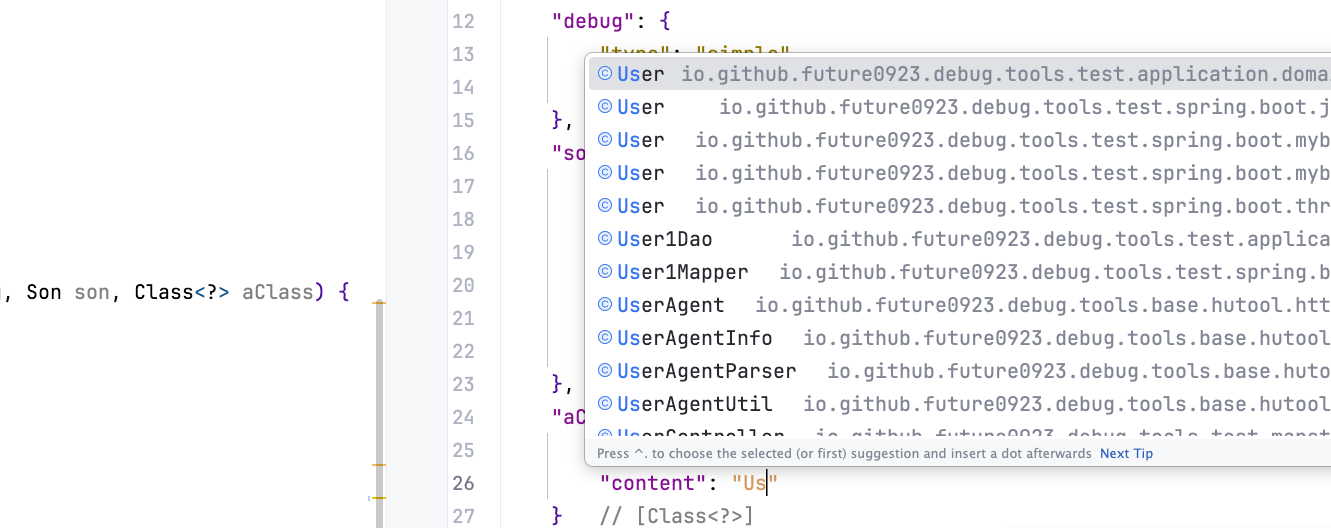
When entering a class name, the editor suggests Java classes available in the project.
json_entity
json_entity is used for regular objects, arrays, collections, maps, and most complex DTOs.
Entity Object
For object parameters, write a JSON object in content:
{
  "query": {
    "type": "json_entity",
    "content": {
      "userId": 10001,
      "status": "ENABLE",
      "tags": ["vip", "new"],
      "page": {
        "current": 1,
        "size": 20
      }
    }
  }
}
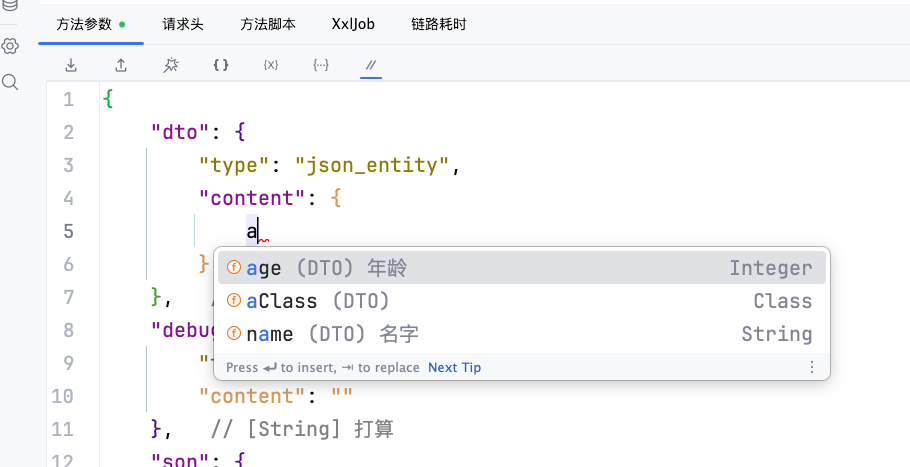
When filling content for an entity type, the editor suggests available field names according to the DTO. Each candidate shows the field comment summary and field type. Fields already written are not suggested again.
Array or Collection
For arrays or collection parameters, write a JSON array in content:
{
  "ids": {
    "type": "json_entity",
    "content": [10001, 10002, 10003]
  },
  "users": {
    "type": "json_entity",
    "content": [
      {
        "id": 10001,
        "name": "Tom"
      },
      {
        "id": 10002,
        "name": "Jerry"
      }
    ]
  }
}
Map
For map parameters, write a JSON object in content:
{
  "attrs": {
    "type": "json_entity",
    "content": {
      "tenant": "default",
      "debug": true
    }
  }
}
Enum Field
If a DTO field is an enum type, pass the enum by its NAME value.
When entering an enum name value, the editor suggests available enum constants and shows the enum comment summary after each candidate.
Class Field
If a DTO field is Class<?>, pass the class by class name.
When entering a class name, the editor suggests Java classes available in the project.
File Field
If a DTO field type is java.io.File or MultipartFile, the field value can be the absolute path of a file on the target application machine. MultipartFile is converted to a mock file object.
{
  "uploadDTO": {
    "type": "json_entity",
    "content": {
      "type": "zip",
      "file": "/tmp/demo.zip",
      "multipartFile": "/tmp/demo.zip"
    }
  }
}
When filling File, MultipartFile, or similar file fields in content, enter file to trigger the file path completion item, then choose a file path to write it into the current JSON string.
bean
bean is used for component objects that already exist in Spring, Solon, or the target JVM. content can be omitted.
{
  "orderService": {
    "type": "bean"
  }
}
The target JVM first gets the last Bean by parameter type from the Spring container. If not found, it tries to find it from Solon or existing JVM instances. If still not found, it tries to create an instance through a constructor.
lambda
lambda is used for @FunctionalInterface interface parameters. Write a Java Lambda or method reference expression string in content; it must contain -> or ::.
{
  "predicate": {
    "type": "lambda",
    "content": "value -> value != null"
  },
  "mapper": {
    "type": "lambda",
    "content": "String::valueOf"
  }
}
request
request is used for request object parameters. Business content is usually not required. content can be omitted or set to null.
{
  "request": {
    "type": "request",
    "content": null
  }
}
In Spring environments, javax.servlet.http.HttpServletRequest, jakarta.servlet.http.HttpServletRequest, org.springframework.http.server.reactive.ServerHttpRequest, and org.springframework.web.server.ServerWebExchange are supported.
TIP
- The headers and other data filled in the invocation page can also be obtained.
- WebFlux request objects are built from the headers of the current request page.
response
response is used for response object parameters. Business content is usually not required. content can be omitted or set to null.
{
  "response": {
    "type": "response",
    "content": null
  }
}
In Spring environments, javax.servlet.http.HttpServletResponse, jakarta.servlet.http.HttpServletResponse, and org.springframework.http.server.reactive.ServerHttpResponse are supported.
unknown
unknown is a fallback type. IDEA may generate it when it cannot identify the parameter type, but the target JVM has no dedicated conversion logic for it, so the actual invocation usually receives null.
{
  "arg": {
    "type": "unknown",
    "content": null
  }
}
When you see unknown, manually change it to a convertible type such as simple, json_entity, or bean according to the real Java parameter type.
Parameter Editor Toolbar
The toolbar in the method parameter tab is used to convert, format, and regenerate the current parameter JSON.
| Icon | Button | Description |
|---|---|---|
 | Import | Convert other parameter formats into DebugTools method parameter JSON. |
 | Export | Convert the current DebugTools method parameter JSON into another format and copy the converted result. |
 | Format | Format the current parameter JSON so it is easier to read and edit. |
 | Gen Param | Regenerate the parameter template in Simple mode, keeping only type and minimum content. |
 | Gen Param With Default Current Entity Class | Regenerate the parameter template in Current mode, expanding fields of the current entity class. |
 | Gen Param With Default All | Regenerate the parameter template in All mode, expanding fields of the current entity class and parent classes. |
 | Show parameter comments | Show or hide line-end type and comment hints in the parameter JSON. |
WARNING
Regenerating the parameter template overwrites the current content in the editor. Save or copy the current JSON first if you need to reuse it.